
Updated
Play NAS Videos on Android With SMB
Use an SMB source to browse and play videos stored on a NAS, Windows PC, Mac, or another server on your local network. Stream can scan selected SMB folders into the same movie and TV library as your local files. If the share is not enabled yet, start with How Do I Connect a Synology, QNAP or Windows Share?.
The result: your Android phone can browse movies and TV episodes by poster, keep playback progress, and play files directly from the share. You do not need a separate Stream server.
For a free playback check, use an MP4 or M4V video at 1080p or lower. MKV and other supported non-MP4 containers have a 5-minute preview; continuing them requires Pro. See Free vs Stream Pro before testing a large collection.
Before You Begin
- Enable SMB file sharing on the computer or NAS.
- Note the server hostname or IP address and the share name.
- Make sure the Android device is on a network that can reach the server.
- Have a username, password, and domain ready if the share requires them.
Add the SMB Source
On a fresh install, choose Folders, then SMB in the first-source setup. If you have already added a source, follow the File Source steps below.
- Open File Source in Stream.
- Choose Add File Source, then select SMB under Network Share.
- Enter a recognizable name, such as
Living Room NAS. - Enter the server and share path, such as
192.168.1.20/media. - Enter the username, password, and domain only when the server requires them.
- Choose Add. Stream verifies the connection before saving it.
Stream can scan for SMB servers advertised on the local network. Tap a discovered server to fill its address, or enter the address manually when discovery does not find it.
See the Connection Form
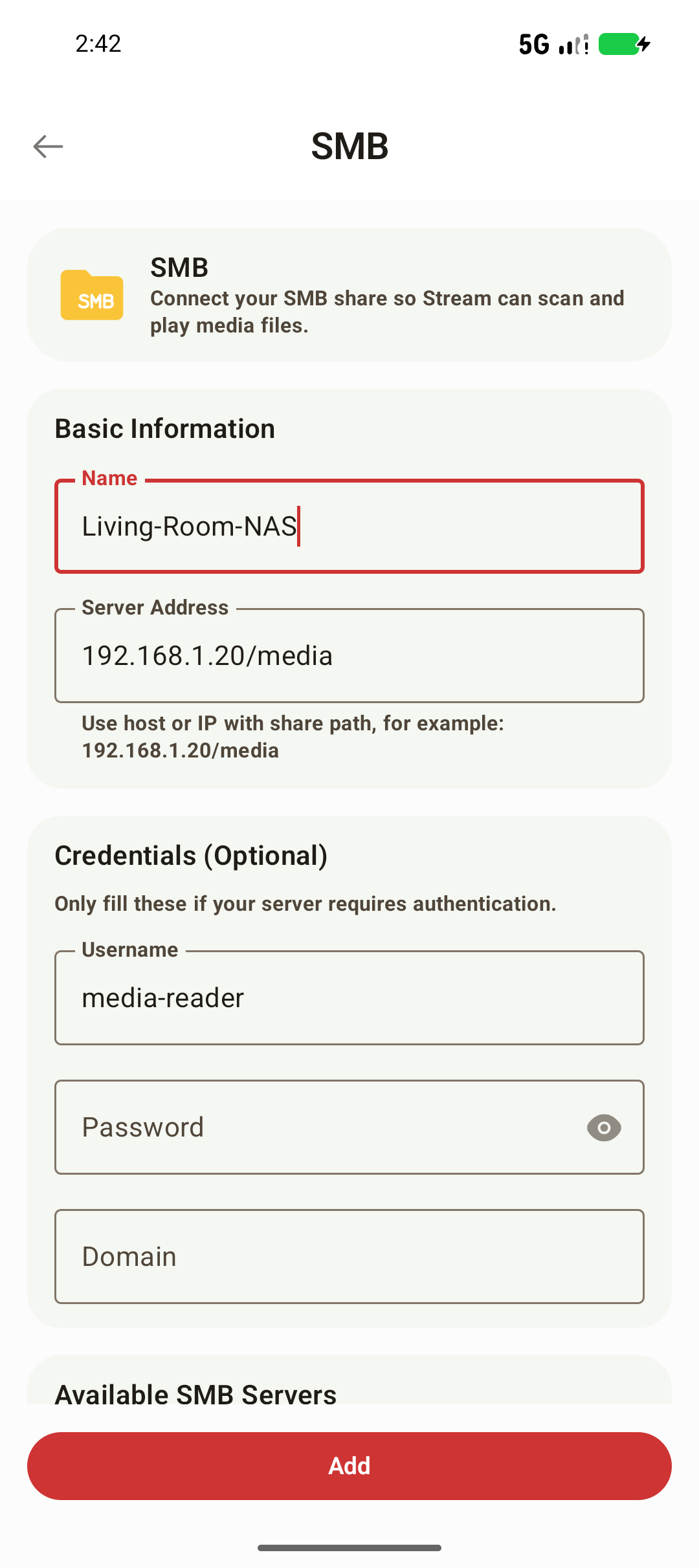
| Field | Example | What belongs here |
|---|---|---|
| Name | Living-Room-NAS | A label you will recognize in Stream |
| Server Address | 192.168.1.20/media | The server address followed by the SMB share name |
| Username | media-reader | An account that can list and read that share |
| Password | Your SMB password | The password for that account |
| Domain | Leave empty unless required | The domain specified by your server or account |
Add SMB Folders to the Library
- Open the saved SMB source and check that it lists your files.
- Browse to a folder containing movies or TV shows and select it for the media library.
- Start a scan when prompted, then return to the library to see matched titles and artwork.
Start with a small folder so you can check the result before scanning your whole NAS. For better matching, use the recommended movie and TV file names. If a title has the wrong poster, correct its metadata.
Get to Your First Playback
Begin with one folder containing a video you can already open on another device. Check sound, subtitle selection, and seeking on your own phone. Codec and HDR compatibility depend on the device even with Stream Pro.
After scanning, open the title in the library and press Play. Keep the NAS online and the Android device on a network that can reach it. If the file plays from the source browser but does not appear in the library, check folder selection and the scan rather than changing working credentials.
Leave playback and open the same title again to check the saved position. If playback buffers, follow the network and buffering checks before scanning the library again.
Supported Scope
Stream connects to SMB shares over the network and plays supported media directly from the source. The server must remain online and reachable while browsing or playing content.
This walkthrough is for Android phones. The Android TV app is coming soon and is not yet on Google Play. If you are comparing players, see Infuse alternatives on Android.
Common Problems
- No servers are discovered: Grant local-network access if requested, confirm Wi-Fi is enabled, or enter the server address manually.
- Connection failed: Check the IP address, share path, username, password, and optional domain. See Why Can't Stream Connect to My SMB Share?.
- The server works on a PC but not Android: Check guest isolation, VPN rules, firewall settings, and whether TCP port 445 is reachable.
- Playback stops or buffers: Test closer to the router or use a wired connection for the server. See Why Does My Video Buffer or Stutter?.
Check the Share Path, Not Just the NAS Address
For a share named media on 192.168.1.20, enter 192.168.1.20/media. A NAS management page such as http://192.168.1.20:5000/ is a different service and is not an SMB share address. Use the share name configured by the server, which may differ from the folder name shown in its file manager.
If discovery finds the server but adding it fails, enter the share path manually. Discovery does not establish that your account can read a particular share.
Separate Login Problems From Network Problems
- Confirm that the Android device and NAS can reach each other. Check guest Wi-Fi isolation, VPN routing and firewall rules for SMB.
- Verify the same share with the same user account from another device on that network.
- Check the account's permissions on both the share and the folder. A successful NAS web login does not guarantee SMB access.
- Re-enter the password exactly as configured. Use the domain field only when your server or account requires it.
A Saved Source Has an Empty Library
Open the source first. If no files can be listed, resolve access before scanning again. If videos are visible, select a folder for the library and scan it. A scan can complete with no supported video files, and unclear names can prevent a reliable movie or episode match. See the file naming guide for examples.
If a previously working source stops responding, check whether the NAS IP address changed. Update the saved source address and credentials before refreshing its library.
Privacy and Credentials
SMB credentials are used to access the share you configured. Passwords are not uploaded with Stream's Google Drive sync data and may need to be entered again on another device.